Monthly Archives: February 2020
Query/Link Between Oracle Apps Sourcing and Purchase Order(PO)
Below is the Query in for a High Level
SELECT paha.award_status,
pa.acceptance_type,
pbh.contract_type,
pha.segment1,
— ap.vendor_name,
— ap.vendor_id,
— hp.address1,
— hp.city,
— hp.postal_code,
— hp.state,
— hp.county,
— hp.country,
pha.org_id
— ,php.TRADING_PARTNER_NAME,
— php.TRADING_PARTNER_CONTACT_NAME
–,fu.user_name
— fu.EMAIL_ADDRESS
— PAIPA.ITEM_description
FROM pon_bid_headers pbh,
pon_auction_headers_all paha,
pon_acceptances pa,
po_headers_all pha
— ,pa_projects_all ppa
,ap_suppliers ap
,hz_parties hp
— ,pon_bidding_parties php
— ,ap_supplier_sites_all assa
— ,ap_supplier_contacts asca
— ,fnd_user FU
— ,pon_auction_item_prices_all paipa
WHERE pbh.auction_header_id(+) = paha.auction_header_id
— AND php.auction_header_id = paha.auction_header_id
— AND pbh.auction_header_id = php.auction_header_id
AND pa.auction_header_id = pbh.auction_header_id
— AND pa.auction_header_id = php.auction_header_id
— AND PAIPa.auction_header_id = php.auction_header_id
AND ap.vendor_id = pbh.vendor_id
— AND ap.vendor_id = assa.vendor_id
— AND assa.vendor_site_id = asca.vendor_site_id
— AND assa.org_id = 204
— AND fu.user_id = paha.buyer_id
AND pbh.po_header_id = pha.po_header_id
— AND paha.project_id = ppa.project_id(+)
AND ap.party_id = hp.party_id
— AND paha.auction_header_id = 78
AND pa.acceptance_type = ‘AWARDED’;
dmenu in i3 failed while pressing $mod+d in Manjaro i3
I have recently Installed Manjaro i3 and then when tried to use $mod+d to invoke dmenu it was not working.
After searching in the Internet I got the below info to execute dmenu_recency. How I came to Invoke this Command is by going to ~/.i3/config
In the config file the
bindsym $mod+d exec –no-startup-id dmenu-recency
Now when I tried to invoke dmenu-recency I was getting the below error in the screenshot

After searching I have added the Language line in /usr/bin/dmenu_run 
But still my Issue was not solved
Again after search I found this article
I Opened my Terminal and executed the below command
$export LC_CTYPE="en_GB.utf8"
After Executing it was still giving me error. So I checked what was the locale that was configured.
$ emacs /etc/default/locale
Here I found that my Locale was in Indian English so I changed the Command the above command and executed
$ export LC_CTYPE=”en_IN.utf8″
Wow. Now the dmenu_recency just worked.
Again when Executing the $mod+d still it was not working due to conflict with my host system. Due to this I started to change the Key Binding in the i3 config file.
Thanks
Installing Virtual Box Guest Additions in Manjaro i3 Edition
From your host Virtual Box Insert the Guest Additions CD Image.
As a Pre-Requisite Install the Kernel Header as my Linux kernel is 5.4 series and so Im installing by the below command
$sudo pacman -S linux54-headers
Now we need to mount the Virtualbox Guest Additions Image so Im creating a folder to mount
$ mkdir /opt/cdrom
#mount /dev/cdrom /opt/cdrom
#cd /opt/cdrom
#./VBoxLinuxAdditions.run
Now Reboot Mod+0 and press r to Reboot.
Let me know any tips/hacks in regard
Windows restarts while opening Virtual Box after installing Docker
I have faced this Issue that my windows 10 gets restarted while opening Virtual Box. Recently I have Installed docker and uninstalled it. But I was facing this Issue and then after searching I got the solution
Virtual Box Version : 6.1.2
To get VirtualBox running again, complete the following steps:
- Open the “old” Windows Control Panel -> Programs and Features
- On the left side choose “Turn Windows features on or off:
- Deselect “Hyper-V” , Containers and other options in the list of features:
Application Guard
Credential Guard
Device Guard
<any> * Guard
Containers
Hyper-V
Virtual Machine Platform
Windows Hypervisor Platform
Windows Sandbox
Windows Subsystem for Linux (WSL)
And to disable Hyper-V from starting the following command can be used:
bcdedit /set hypervisorlaunchtype off
- Click “OK”, let Windows deinstall Hyper-V and reboot at end
- After reboot you have to reinstall/repair your installation of VirtualBox with the original installer!
- Reboot again and it should work
OAF in Workflow Notifcation
There are two ways to Include a OAF Page or Region in Workflow Notification that is by
- Link
- Embedding the Region
I have created a simple Workflow process and I have deployed the OAF Page and Region(Standalone Region)
Below it the process 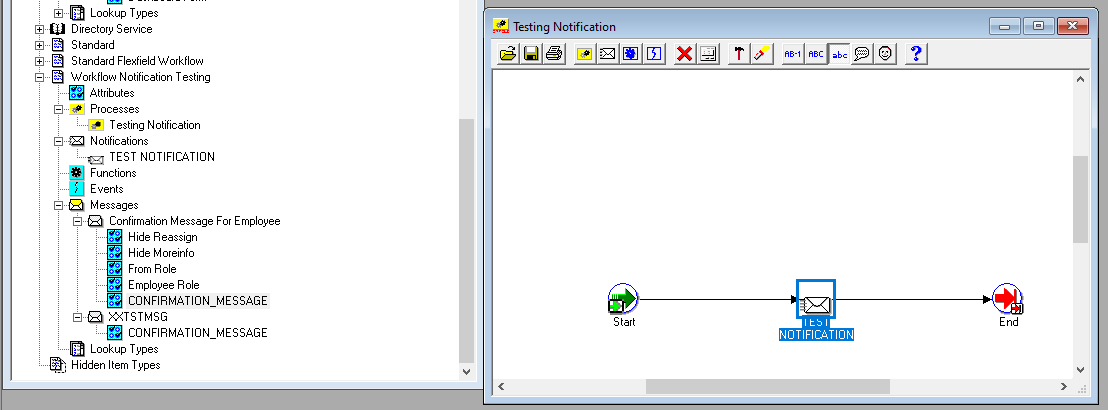
- By using Link

Configure the Notification
Link URL : OA.jsp?page=/xx/oracle/apps/xxcus/prob/eval/webui/xxProbDownPG&phid=306
phid is the Parameter
306 is the Value
Ensure the below Points
- Link URL has the Page
- Page referred has been properly deployed in Instance
- Attach Content Check box has been Checked
- URL has been Selected properly
- Attribute has been properly attached to the Notification
2. By Attaching the Region to the Notification

Configure the Notification
Attachment URL : JSP:/OA_HTML/OA.jsp?page=/xxProb/oracle/apps/xxcus/prob/eval/webui/xxProbDownRN&phid=306
phid is the Parameter
306 is the Value
Ensure the below Points
- Document Attachment has the OAF Region with Stack Layout
- Region referred has been properly deployed in Instance with Standalone to True
- Attach Content Check box should not be Checked
- URL has been Selected properly
- Attribute has been properly attached to the Notification
- Message Body should have &CONFIRMATION_MESSAGE this format as this will be reffered


 pacesettergraam