Daily Archives: February 4, 2020
OAF in Workflow Notifcation
There are two ways to Include a OAF Page or Region in Workflow Notification that is by
- Link
- Embedding the Region
I have created a simple Workflow process and I have deployed the OAF Page and Region(Standalone Region)
Below it the process 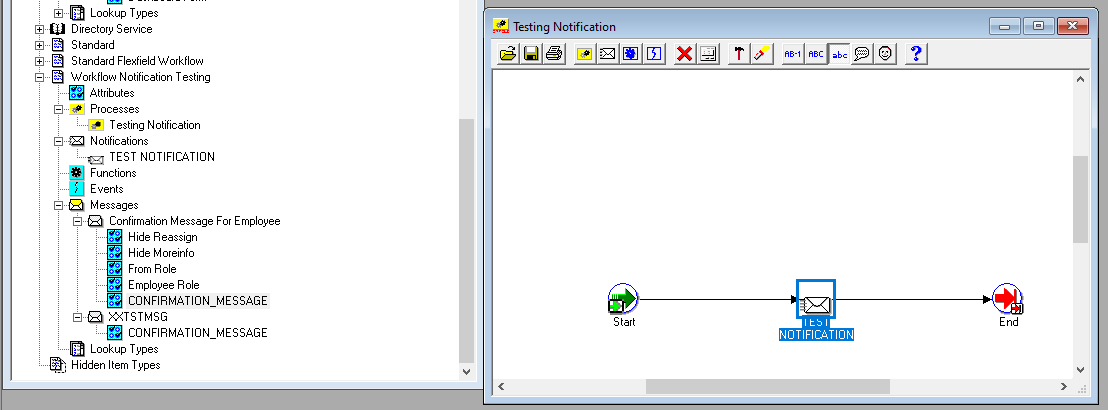
- By using Link

Configure the Notification
Link URL : OA.jsp?page=/xx/oracle/apps/xxcus/prob/eval/webui/xxProbDownPG&phid=306
phid is the Parameter
306 is the Value
Ensure the below Points
- Link URL has the Page
- Page referred has been properly deployed in Instance
- Attach Content Check box has been Checked
- URL has been Selected properly
- Attribute has been properly attached to the Notification
2. By Attaching the Region to the Notification

Configure the Notification
Attachment URL : JSP:/OA_HTML/OA.jsp?page=/xxProb/oracle/apps/xxcus/prob/eval/webui/xxProbDownRN&phid=306
phid is the Parameter
306 is the Value
Ensure the below Points
- Document Attachment has the OAF Region with Stack Layout
- Region referred has been properly deployed in Instance with Standalone to True
- Attach Content Check box should not be Checked
- URL has been Selected properly
- Attribute has been properly attached to the Notification
- Message Body should have &CONFIRMATION_MESSAGE this format as this will be reffered


 pacesettergraam